
Representation of a connected smart home system with multiple device categories. Source: Wikimedia Commons, CC BY-SA 4.0
Polish residential electricity tariffs and automation
Poland's electricity market for residential customers is regulated by the Energy Regulatory Office (Urząd Regulacji Energetyki, URE). Households are assigned one of several tariff groups. The two most common for residential use are G11 (single-rate, 24-hour flat rate) and G12 (two-rate, with a cheaper night tariff).
G12 customers pay a lower rate during specified hours — typically 22:00–06:00 and in some contracts also 13:00–15:00. This creates a direct incentive to shift energy-intensive tasks such as dishwasher and washing machine cycles to these off-peak periods. Home automation systems can enforce this scheduling without requiring manual intervention.
URE publishes approved tariff tables for each licensed energy supplier. G12 off-peak rates are typically lower than G11 flat rates, but whether switching tariffs saves money depends on the household's actual usage pattern across the day. URE's online tariff database is available at uregulatorem.pl.
Reducing standby consumption
Standby power draw — electricity consumed by devices that are powered on but not actively in use — accounts for a measurable portion of residential electricity bills. Televisions, game consoles, amplifiers, and chargers all draw power in standby mode. Smart plugs with energy monitoring make standby consumption visible and actionable.
Identifying standby loads
A smart plug with energy monitoring — such as the Shelly Plug S or the Fibaro Wall Plug — reports real-time power consumption in watts. Plugging a television into such a device and observing the reading in standby (typically 0.5–3 W for modern sets, but up to 10 W for older devices) provides the baseline for an automation decision.

Wall switch integration is a common starting point for home automation lighting control. Source: Wikimedia Commons, CC BY-SA 4.0
Automating standby cut-off
A simple automation cuts power to a device group after a defined period of inactivity. In Home Assistant, this involves monitoring the power reading from a smart plug and triggering a "turn off" action if consumption drops below a threshold for more than a set number of minutes:
# Home Assistant automation — cut TV standby after 30 minutes
alias: "TV standby off"
trigger:
  - platform: numeric_state
    entity_id: sensor.tv_plug_power
    below: 5
    for:
      minutes: 30
action:
  - service: switch.turn_off
    target:
      entity_id: switch.tv_plug
This approach is particularly effective for home offices, where monitors, printers, and desk lamps can be grouped onto a single smart power strip controlled by a single automation.
Heating schedule optimisation
Heating accounts for a substantial share of energy costs in Polish households, particularly in older buildings without recent insulation upgrades. Most district heating systems (ciepłownictwo miejskie) provide hot water to radiators, and the flow is regulated by thermostatic radiator valves (TRVs).
Smart TRVs
Smart thermostatic radiator valves replace the manual head on a standard radiator valve. They accept schedules and temperature setpoints from a hub and adjust the valve position accordingly. Devices such as the Danfoss Eco 2 (Bluetooth-based) and the Eurotronic Spirit Z-Wave work with Polish district heating radiators, which use the standard M30×1.5 thread.
Basic heating schedule for a working household
- 06:00 — raise bedroom setpoint to 20°C (30 minutes before wake time)
- 08:00 — reduce all rooms to setback temperature (17°C) when occupants leave
- 16:30 — raise living room to 21°C ahead of return
- 22:00 — reduce all rooms to 18°C for sleeping
- 00:00 — reduce to minimum setpoint (15°C) in unoccupied rooms
This schedule avoids heating empty rooms during work hours. In a building with average thermal insulation, reducing the setpoint by 2°C for 8 hours per day produces a noticeable reduction in radiator runtime over a heating season, though the exact figure varies by building construction, climate zone, and boiler type.
Lighting routines
LED replacement lamps consume significantly less electricity than the incandescent or halogen lamps they replace — typically 8–12 W versus 40–60 W for comparable light output. However, lights left on in unoccupied rooms still represent avoidable consumption. Motion-triggered lighting is the simplest intervention.
Corridor and bathroom automation
Corridors and bathrooms are natural candidates for occupancy-based lighting: they are entered briefly and frequently, and lights are often left on by mistake. A PIR motion sensor paired with a Z-Wave or Zigbee relay can turn the light on when motion is detected and off after a configurable timeout (typically 3–5 minutes for corridors, 10–15 minutes for bathrooms).
Adaptive brightness
Dimming lights to 50–70% brightness in the evening — rather than switching them off — is more practical for many households. Smart dimmers such as the Fibaro Dimmer 2 (Z-Wave) or the IKEA Tradfri wireless dimmer (Zigbee) support this via time-based automations. Reducing brightness also extends LED lamp life, though the energy saving from dimming alone is modest.
Energy monitoring and visibility
Before optimising consumption, knowing where electricity is used is necessary. A whole-home energy monitor — such as the Shelly 3EM or the Clamp Meter accessory for the Fibaro Home Energy Controller — attaches to the main circuit breaker panel and reports per-circuit consumption in real time.
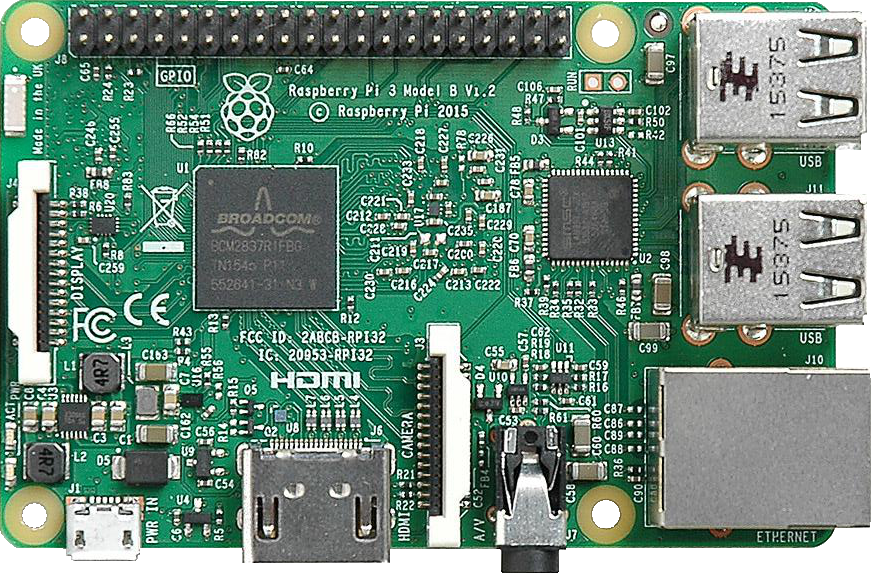
A Raspberry Pi single-board computer, commonly used as a local Home Assistant hub for energy monitoring and automation. Source: Wikimedia Commons, CC BY-SA 4.0
Home Assistant's Energy Dashboard aggregates data from smart plugs and energy monitors and displays daily and monthly consumption broken down by device. This makes it straightforward to identify which appliance or room accounts for unexpected usage.
Setting consumption alerts
An automation that sends a notification when the whole-home consumption exceeds a threshold (e.g., 3 kW sustained for more than 10 minutes) can indicate that something has been left running that should not be — an oven, a space heater, or a pump in a malfunction state.